
详细介绍
项目简介
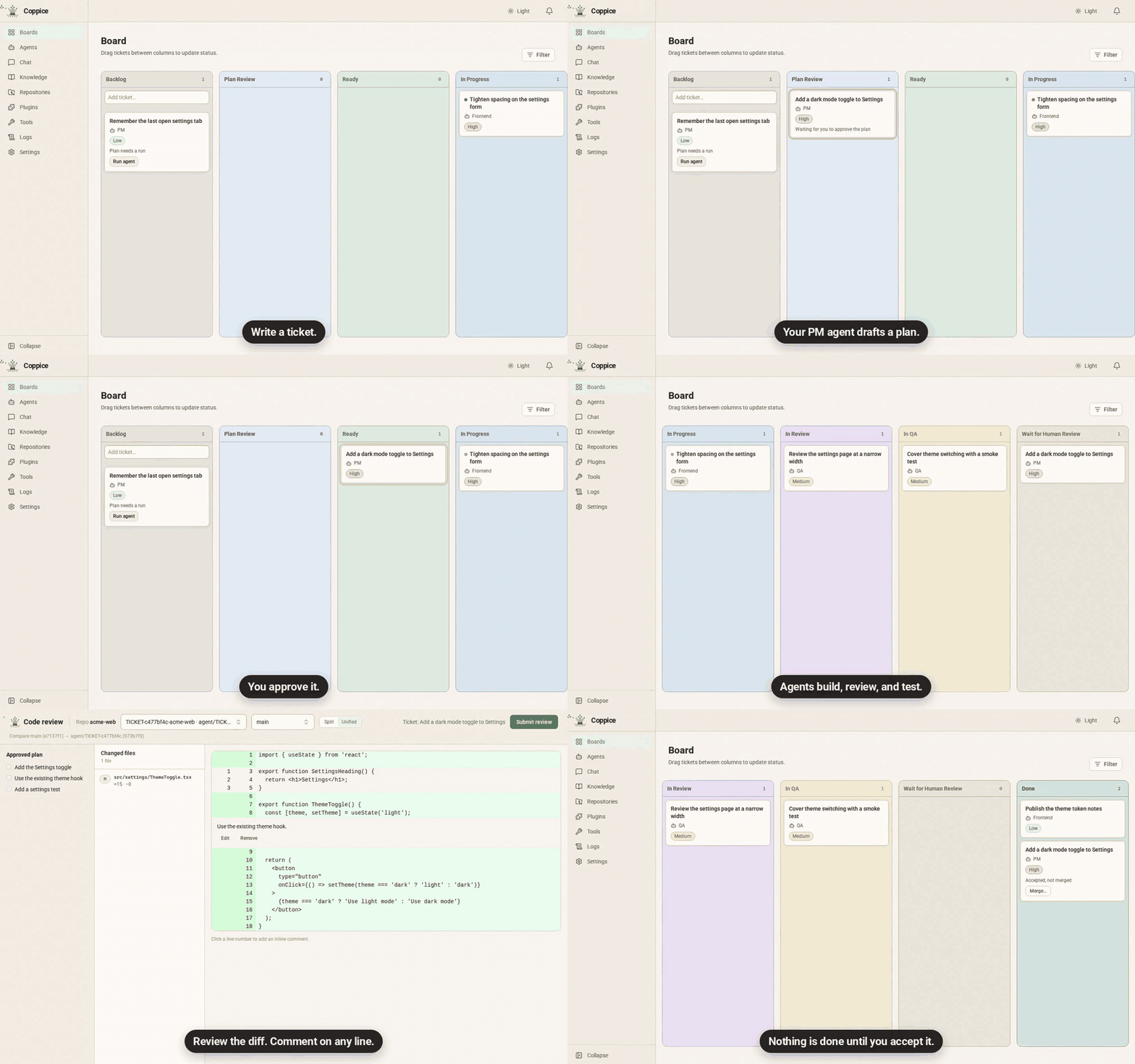
Coppice 是一个面向多智能体编码的本地桌面应用。智能体在同一块看板上规划、构建和评审,你始终保留最终决定权。它运行在你自己的机器上,开源,并且直接驱动你已经在付费使用的 agent CLI,不需要再订阅一份服务。
每个 agent 使用各自的 CLI 和模型,你可以在同一块看板上用最强的模型做规划和评审,用更快的模型写代码。所有工作以卡片形式集中呈现,被阻塞的工单和等待你评审的工作会突出显示。
主要功能
- PM agent 规划:PM agent 阅读工单并起草计划,包括思路、步骤和验证方式,你批准后才开始写代码。
- 设计方案确认:当工单涉及界面变化时,agent 会给出几种布局并标注推荐项,你选定后计划按该选择推进。
- 并行构建:专业 agent 分头构建、评审和测试工单,每个工单拥有独立的 git worktree,并行工作不会干扰你的主检出。
- 代码评审:在应用内阅读 diff 并逐行评论。未被你接受的内容不算完成,Accept 与 Merge 是两个独立的操作。
- 与 agent 对话:可以聊代码、想法或工单;agent 能起草工单或建议知识笔记,但未经你批准不会保存。
- 卡片承载一切:评论、计划和 agent 运行记录都保存在工单上,agent 之间只通过工单评论交流。
- Knowledge:agent 会为后续工单记录项目笔记,默认由你批准保留哪些内容。
- 插件:为 agent 提供技能和 MCP 工具,可从 git 或本地文件夹安装插件,并指定哪些 agent 可以使用。
- 自动更新:Linux 版通过 apt 更新,macOS 版自行更新。
安装与使用
Coppice 自带数据库和服务器,不需要 Docker 或 Postgres。agent 运行在你的机器上,因此需要先在宿主机安装 Git 以及你打算使用的 agent CLI(例如 claude 或 codex),并分别登录。
macOS(Apple silicon 用 mac-arm64,Intel 用 mac-x64):
- 打开
Coppice-<version>-mac-<arch>.dmg,把 Coppice 拖入 Applications。 - 从 Applications 启动。首次启动需要几秒钟创建数据库。
Linux(Ubuntu 22.04+ / Debian 12+,amd64 或 arm64):
sudo apt install ./Coppice-<version>-linux-<arch>.deb
安装 .deb 会添加 Coppice 的软件源,后续版本随系统更新一起到达,也可以运行 sudo apt update && sudo apt upgrade。看板和设置会保留;卸载可运行 sudo apt remove coppice-desktop。
Windows 11 可通过 WSL 使用。更多安装说明见 官方文档,首次配置 agent 和工单可参考 Getting started。
注意事项
Coppice 目前处于 beta 阶段,遇到问题或体验不佳可以在 GitHub Issues 反馈。它不是一个云端编码服务,不是 Jira 的替代品,也不是「告诉 agent 就能拿到成品」的工具。项目采用 Apache 2.0 许可证。
本作品整理自 GitHub 开源项目 fertile-org/coppice,原作者 @fertile-org,许可证 Apache-2.0。中文介绍由 AI 根据项目 README 整理,以原仓库为准。
更新记录
- v0.1.13当前版本
**Full Changelog**: https://github.com/fertile-org/coppice/compare/v0.1.12...v0.1.13 ## Install Coppice bundles its own database and server, so you don't need Docker or Postgres. Agents run on your machine, so first install **Git** and the agent CLIs you plan to use (for example `claude` or `codex`) on the host and log in to each of them. ### macOS (Apple silicon: `mac-arm64`, Intel: `mac-x64`) 1. Open `Coppice-<version>-mac-<arch>.dmg` and drag **Coppice** to **Applications**. 2. Launch Coppice from Applications. The first launch takes a few seconds while it creates its database. ### Linux (Ubuntu 22.04+ / Debian 12+, `amd64` or `arm64`) ```sh sudo apt install ./Coppice-<version>-linux-<arch>.deb ``` Installing the `.deb` adds Coppice's package source, so new versions arrive with your other updates, or run `sudo apt update && sudo apt upgrade`. Your boards and settings stay. To remove Coppice, run `sudo apt remove coppice-desktop`. Then start **Coppice** fro
- v0.1.12
**Full Changelog**: https://github.com/fertile-org/coppice/compare/v0.1.11...v0.1.12 ## Install Coppice bundles its own database and server, so you don't need Docker or Postgres. Agents run on your machine, so first install **Git** and the agent CLIs you plan to use (for example `claude` or `codex`) on the host and log in to each of them. ### macOS (Apple silicon: `mac-arm64`, Intel: `mac-x64`) 1. Open `Coppice-<version>-mac-<arch>.dmg` and drag **Coppice** to **Applications**. 2. Launch Coppice from Applications. The first launch takes a few seconds while it creates its database. ### Linux (Ubuntu 22.04+ / Debian 12+, `amd64` or `arm64`) ```sh sudo apt install ./Coppice-<version>-linux-<arch>.deb ``` Installing the `.deb` adds Coppice's package source, so new versions arrive with your other updates, or run `sudo apt update && sudo apt upgrade`. Your boards and settings stay. To remove Coppice, run `sudo apt remove coppice-desktop`. Then start **Coppice** fro
- v0.1.10
精简 README 并调整介绍文案与多语言翻译,重新生成 OG 图;新增「设置 → 用量」展示聊天统计,并为连接器功能打下基础。
评论