
详细介绍
项目简介
LoupixDeck 是一款开源的 Loupedeck 与 Razer Stream Controller 设备控制台应用,用来替代官方厂商软件。它使用 Avalonia 和 .NET 10 构建,原生支持 Windows 和 Linux(含 SteamOS),并提供实验性的 macOS alpha 版本。
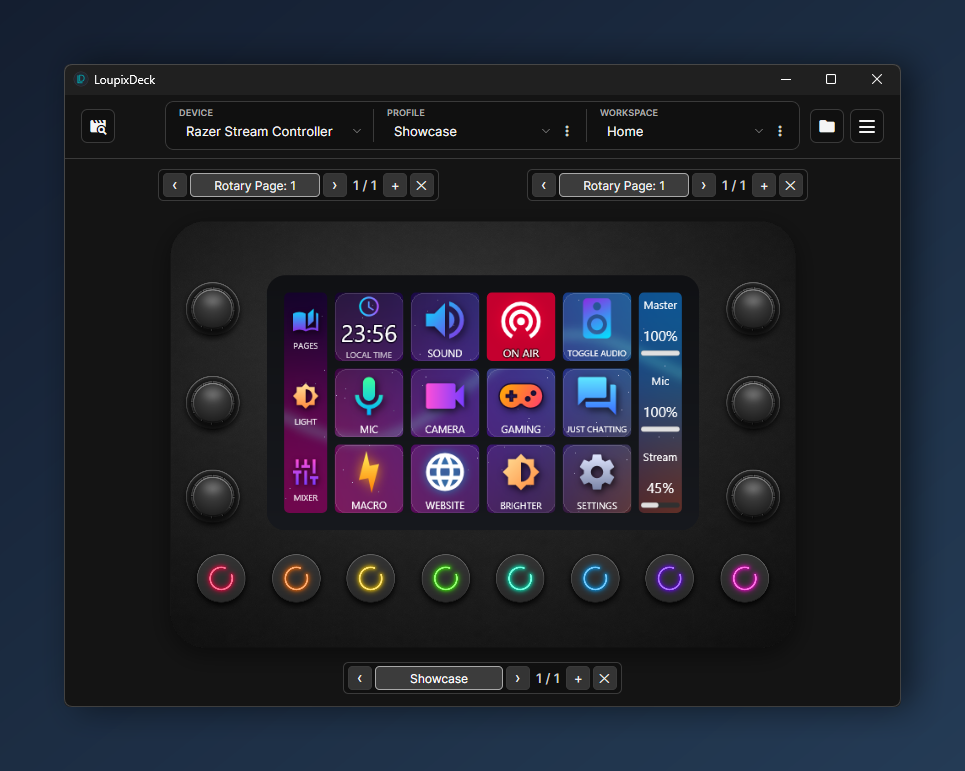
主要功能
- 跨平台:Windows、Linux 原生支持,macOS 为实验性 alpha。
- 布局自定义:Profile → Workspace → Page 三层结构,支持嵌套文件夹与每页壁纸。
- 丰富控件:分层按钮、多状态、旋钮动作、宏、应用聚焦切换。
- 多设备:可同时连接多台受支持的控制器,按 USB 序列号区分并各自保留配置。
- 可扩展:内置 Plugin Store 安装集成,也可基于 Plugin SDK 自行开发。
- 可移植:可将 profile、workspace 或单个页面导出为
.loupixprofile分享。 - 模板与多语言:提供日常控制、媒体、OBS、Resolve、Home Assistant 等模板;界面支持英语、德语和西班牙语。
支持的设备
| 设备 | 状态 | 控件 |
|---|---|---|
| Loupedeck Live | 支持 | 4×3 触摸网格、2 条触摸带、6 个旋钮、8 个圆形按钮 |
| Loupedeck Live S | 支持 | 5×3 触摸网格、2 个旋钮、8 个物理按钮 |
| Razer Stream Controller | 支持 | 4×3 触摸网格、2 个侧面板、6 个旋钮、8 个 LED 按钮 |
| Razer Stream Controller X | 支持 | 5×3 物理按键网格 |
| Loupedeck CT | 支持 | 4×3 触摸网格、滚轮显示屏、6 个旋钮及附加按钮 |
Stream Controller X 使用物理按键,LoupixDeck 会把每个按键映射到对应的显示位置,并支持长按动作。
安装与使用
发布版本为自包含构建,已内置 .NET 运行时。
Windows
从最新 Release 下载安装包或便携包:
LoupixDeck-Setup-win-x64.exe:常规安装LoupixDeck-win-x64.zip:便携使用LoupixDeck-Setup-win-arm64.exe/LoupixDeck-win-arm64.zip:Windows on ARM 设备
便携版解压后运行 LoupixDeck.exe。
Linux
以普通用户身份运行安装脚本,不要加 sudo:
curl -fsSL https://github.com/RadiatorTwo/LoupixDeck/releases/latest/download/install-loupixdeck.sh | bash
安装完成后可从应用菜单启动,或运行 loupixdeck。SteamOS 用户请在桌面模式的 Konsole 中执行同一命令。
macOS(实验性 alpha)
下载 LoupixDeck-osx-arm64.dmg(Apple Silicon)或 LoupixDeck-osx-x64.dmg(Intel),打开后把 LoupixDeck 拖入「应用程序」文件夹。
快速上手
- 连接受支持的设备并启动 LoupixDeck。
- 从左上角打开 Apps and Commands 面板。
- 把应用或命令拖到按钮上,或选中控件后双击条目。
- 选中按钮可自定义图像、文字、符号、动作与状态。
- 通过顶部 Plugins → Plugin Store 安装集成。
没有连接设备时也可以启动,程序会等待设备接入。首次连接设备会弹出模板选择器。
注意事项
- macOS 版本仍为实验性 alpha,功能可能缺失,稳定性不如 Windows 与 Linux。
- 在 macOS 上使用宏和直接键鼠输入需要授予「辅助功能」权限,否则注入的输入会被系统丢弃。
- 官方不提供 Flatpak,因为沙箱会阻止硬件访问、输入模拟、应用启动等许多插件所需的功能。
- 若 Linux 上硬件访问、宏输入或桌面集成异常,可在 Settings → Diagnostics 中使用仅限 Linux 的 Device Doctor 进行只读检查并获取修复命令。
- 应用感知布局在 Windows、Linux X11/XWayland 以及部分 Wayland 合成器上可用,其他无 XWayland 的 Wayland 合成器不支持。
本作品整理自 GitHub 开源项目 RadiatorTwo/LoupixDeck,原作者 @RadiatorTwo,许可证 MIT。中文介绍由 AI 根据项目 README 整理,以原仓库为准。
更新记录
- v1.66.0当前版本
## What's Changed ### Copy and Paste Commands * **Right-click a command** in the touch, simple or dial editor to copy, cut, duplicate or remove it, or to paste after it. Right-click the empty part of the sequence to paste at the end or to copy the whole sequence. * **Select several commands** at once. A click selects a command, Ctrl+click adds or removes one and Shift+click selects a range. The menu then works on all selected commands, and pasted commands are selected right away. * Copied commands keep **all their settings**, so you can move them to another button, another gesture or another device. ### Button Tooltips * Hovering a button in the device view now shows the **values of its commands**, for example "Key Combination (Ctrl+Shift+T)" or "Macro (Macro number 1)". Long values are shortened. * **LED buttons and dials** have a tooltip now too. A dial shows one line each for **Rotate Left**, **Rotate Right** and **Press**. ### Fixes * A touch button **backgroun
- v1.64.0
## What's Changed ### Dial Labels for the Loupedeck Live S * New **dial labels** on the Live S. Each dial can show a label on the key next to it, so you can see what the dial does. Labels follow the dial page. * Turn them on in the **page settings** (shown only for a Live S). They are off by default. * When you turn them on for the first time, LoupixDeck asks whether the keys under the labels should **keep clear** of them. If yes, those keys are drawn on the part beside the label and nothing is hidden. Switching this or the labels off restores the keys exactly as they were. * **Edit a label** by double-clicking it in the device view. The button editor opens it like a touch button with a narrow preview, and new text is laid out as a vertical column. * Labels have **states**. The new commands **Set Dial Label State** and **Reset Dial Label States** switch them, just like the touch button state commands. * **Right-click a label** to Edit, Copy, Cut, Paste or Clear the label its
- v1.63.0
新增 Companion 组的停止与启动(设置中及主窗口设备选择器的暂停/恢复按钮),新增 Companion.StopGroup、StartGroup、ToggleStop 命令;伴随设备现在能显示主设备文件夹内容且为只读;Windows 应用启动器可查找并启动 Microsoft Store 应用。
评论