详细介绍
项目简介
UVtools 是一款面向 MSLA/DLP 光固化(树脂)3D 打印的开源工具,用于切片文件的分析、校准、修复、转换与编辑。作者的出发点是:在 PrusaSlicer 中配置好打印机并切片导出文件后,先用本工具转换成打印机原生格式再打印,从而摆脱厂商切片软件的限制。
它可以帮助你查看支撑结构、发现关键的打印失败风险,也能查看和修改一个项目里用过的树脂与全部打印参数。
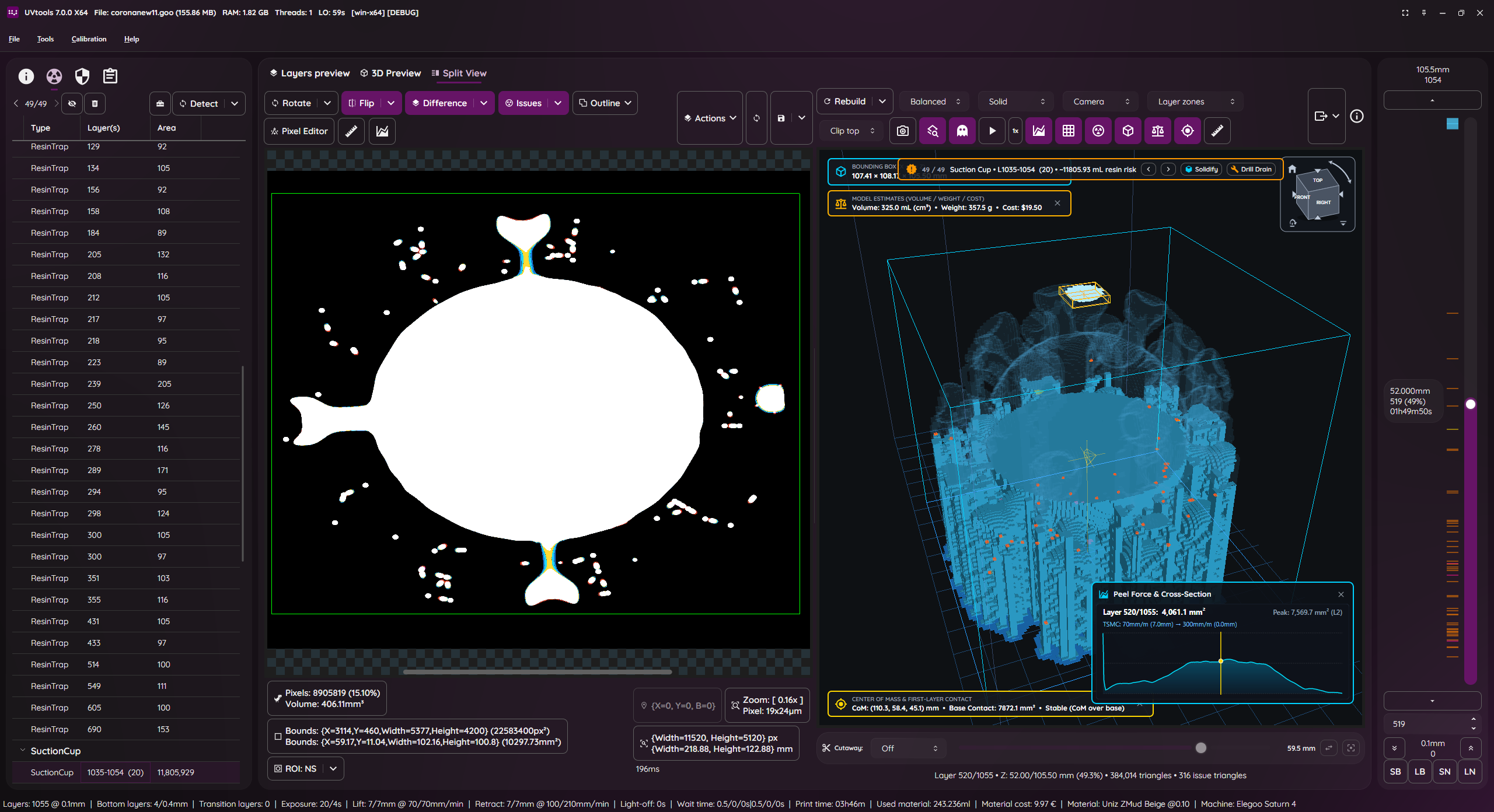
主要功能
- 逐层查看、修改与提取图层图像
- 查看、修改与提取缩略图
- 将文件导出到文件夹
- 查看并编辑所有使用到的属性/设置
- 多种图层变换与过滤工具
- 检查问题并尽可能修复/移除:孤岛(Islands)、悬垂(Overhangs)、树脂陷阱(Resin traps)、吸盘效应(Suction cups)、触碰边界、打印高度、空图层
- 建议与自动修正:层高、底层数量、固化前等待时间、固化后等待时间、过渡层数量、模型位置
- 切片文件格式转换
- 校准测试
- 便携,无需安装
支持的文件格式包括 SL1/SL1S(PrusaSlicer)、CBDDLP/CTB/PHZ 等 Photon 系列、CWS、CXDLP、GOO、PWS/PWX 系列、PRZ、LGS 系列、OSLA、OSF/VLR、NanoDLP Zip、UVJ、VDT、VDA.ZIP、Klipper Zip,以及 png/jpg/tif/bmp 等图片格式等(完整列表见 README)。
安装与使用
从 Releases 页面下载最新版本:https://github.com/sn4k3/UVtools/releases/latest
Windows 包管理器自动安装:
winget install -e --id PTRTECH.UVtools
choco install -y uvtools
Linux 与 macOS 自动安装:
bash -c "$(curl -fsSL https://raw.githubusercontent.com/sn4k3/UVtools/master/Scripts/install-uvtools.sh)"
降级到旧版本(把 x.x.x 换成目标版本):
bash -c "$(curl -fsSL https://raw.githubusercontent.com/sn4k3/UVtools/master/Scripts/install-uvtools.sh)" -- x.x.x
命令行工具 UVtoolsCmd 提供批量处理能力:
Usage:
  UVtoolsCmd [command] [options]

Commands:
  set-properties <input-file> <property=value>                                            Set properties in a file or to it layers with new values
  run <input-file> <classes/files>                                                        Run operations, suggestions and/or scripts
  convert <input-file> <target-type/ext> <output-file>                                    Convert input file into a output file format by a known type or extension
  extract <input-file> <output-folder>                                                    Extract file contents to a folder
  copy-parameters <input-file> <target-files>                                             Copy print parameters from one file to another
  set-preview, set-thumbnail <input-file> <file path|layer index|:random-layer|:heatmap>  Sets and replace thumbnail(s) in the file [default: :heatmap]
  compare <input-file-a> <input-file-b>                                                   Compare two files and output the differences
  print-issues <input-file>                                                               Detect and print issues
  print-properties <input-file>                                                           Prints available properties
  print-gcode <input-file>                                                                Prints the gcode of the file if available
  print-machines                                                                          Prints machine settings
  print-formats                                                                           Prints the available formats
每个命令都可以用 -? 查看该命令的详细帮助和额外选项。
界面程序也可以直接打开文件,或把命令转发给 UVtoolsCmd(适用于 .AppImage 等不直接暴露 UVtoolsCmd 的场景):
UVtools C:\model.osla
UVtools C:\model.zip D:\other_model.osla
UVtools --cmd convert C:\model.osla zip
项目同时提供 PrusaSlicer 的打印机配置与 0.01 mm 到 0.20 mm、轻/中/重支撑的配置文件,并支持通过在 Material Notes / Printer Notes 中写入 TransitionLayerCount_xxx、LightOffDelay_xxx、LiftHeight_xxx、LightPWM_xxx、FILEFORMAT_xxx 等关键字来传递打印参数。
注意事项
- 作者本人并未拥有树脂打印机,全部工作基于虚拟计算,实验性功能请谨慎使用。
- 部分参数只有在目标格式支持时才会生效,否则会被忽略;关键字中的 "xxx" 需替换成对应单位下的实际数值。
- 旧式命令位于 UI 可执行文件下,将被移除,建议优先使用 UVtoolsCmd。
本作品整理自 GitHub 开源项目 sn4k3/UVtools,原作者 @sn4k3,许可证 AGPL-3.0。中文介绍由 AI 根据项目 README 整理,以原仓库为准。
更新记录
- v7.1.2当前版本
Linux 改进 libcvextern 加载失败提示并检查缺失依赖,去除 libtiff.so.5 与 libsqlite3 依赖,修复 Debian 13 / Ubuntu 24.04+ 启动;同时修复 macOS 缺失依赖列表、克隆层文件附着孤岛卡死及若干问题检测误算。
评论