详细介绍
项目简介
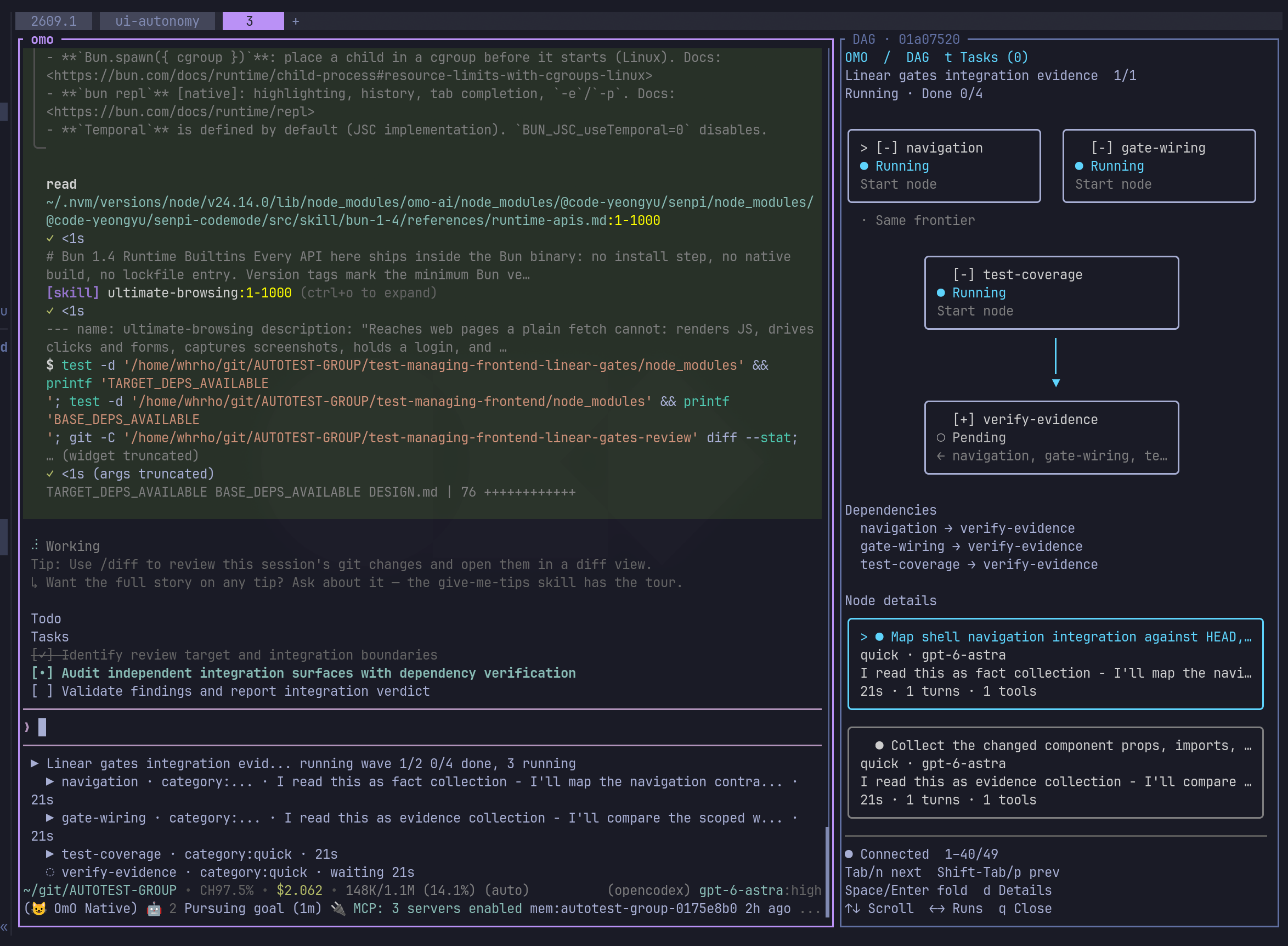
OmO 是一个运行在终端里的 AI Agent 工具。打开项目目录、执行 omo、用自然语言描述任务,它就会去读代码、做规划、写代码并自行验证。它基于作者自己维护的 senpi(pi 的分支),把记忆系统、技能库、多模型调度等能力内置其中。
核心用法是关键词驱动的「图工程」:在 prompt 里加上 ultrawork(或 ulw),Agent 会先读代码库、做计划、逐步验证、在真实界面上检查结果;再加上 mass,整个任务会变成一张由多个 Agent 组成的图,各部分并行运行并按各自合适的模型处理。
主要功能
- ultrawork / ulw:面对较难的任务,在 prompt 中加入该关键词即可进入「先读懂、再规划、逐步证明、真实环境验证」的工作模式。
- mass ulw:把任务拆解成 Agent 图,例如大规模资料调研、完整的机器学习流水线、迁移改造等,分片并行执行并逐项检查。
- Kibitzer 记忆系统:记忆以 markdown 文件存放在 git 仓库中,由一个成本较低的小模型在旁边读取历史、在主线模型重犯错前给出提醒。
- 多模型混用:
/login可登录 Claude、ChatGPT、Kimi、GLM 等订阅;每个模型配有对应的系统提示词,可按任务分配给不同模型。 - 技能(skills):内置解决实际问题所需的知识(含浏览器使用),按任务需要动态加载。
- 工程细节:独立工具调用合并为一次往返、参数格式错误自动修复、等待构建/部署不再靠轮询、长任务保留检查记录以便续跑、配置与提示词热重载。
- 会话管理:
/resume或/sessions打开历史会话,omo -c继续上一次会话,omo -r打开选择器。 - 从旧版迁移:运行
omo setup可迁移 provider 密钥、自定义 provider、MCP server、技能与模型选择;omo doctor查看各类任务可用的 provider,omo doctor --models查看各任务类别与 Agent 的模型顺序。
安装与使用
macOS / Linux:
curl -fsSL https://get.omo.dev/install.sh | bash
omo
Windows PowerShell:
irm https://get.omo.dev/install.ps1 | iex
安装脚本会把对应系统与 CPU 的原生 omo 二进制装到 ~/.local/bin,并按 release 校验和核对,镜像不可达时回退到 GitHub Releases。
也可以用包管理器安装同一份 OmO(包名是 omo-ai,npm 上另一个无关的 omo 包不是本项目):
bun add -g omo-ai
安装后进入项目目录运行 omo 并描述任务即可。会话内常用命令:/thinking <level> 设置思考强度(Shift+Tab 循环切换),/efforts <level> 直接设置推理强度,/help 列出全部命令。
更新:重新执行安装命令;包管理器安装的使用 omo update。卸载:rm ~/.local/bin/omo,或 bun remove -g omo-ai。
注意事项
- 配置文件位于
~/.omo/omo.jsonc,项目可另加.omo/omo.jsonc,就近的文件优先。 - 会话内
/bug可提交问题报告,发送前会展示报告内容;报告包含引擎日志、脱敏后的环境与配置、会话记录以及设备名、安装 id、会话哈希等标识信息,从桌面端提交时还会附带账号信息。 - 安装渠道可通过在
bash后追加-s -- beta或具体版本号切换;Windows CMD、PATH 修正等细节见 omo.dev/docs/install。 - 更多文档:omo.dev/docs、配置参考、功能说明、从 OpenCode 迁移。
本作品整理自 GitHub 开源项目 code-yeongyu/oh-my-openagent,原作者 @code-yeongyu。中文介绍由 AI 根据项目 README 整理,以原仓库为准。
更新记录
- v5.1.57当前版本
Runs on senpi 2026.10.31-2: Claude subscription sign-in now goes through the Claude Code CLI (accounts from the old sign-in are asked once to sign in again, keeping their name, pin and order), `/gpt-account unblock <id>` clears a usage-limit block after you reset it on the provider side, a finished turn no longer sits at "Working" while an extension's settle handler is slow, and startup warns when a skills root's ignore file hides a skill folder. A Claude OAuth token given to the plain `anthropic` provider is now refused with a pointer at `/login anthropic-subscription` instead of being sent as Claude Code, so omo no longer rewrites the engine's Claude Code version at install; every skill a prompt invokes now loads instead of stopping at five. ([#11983](https://github.com/code-yeongyu/oh-my-openagent/pull/11983))
- v5.1.56
Distrusted intermediate certificates under an allowed root are not yet blocked; tracked upstream. ([#11956](https://github.com/code-yeongyu/oh-my-openagent/pull/11956))
- v5.1.54
5.1.53 and 5.1.52 were not published; their changes, listed under 5.1.53 and 5.1.52 below, ship in this release.
评论